Microsoft Reconsiders Copilot Key: Users Will Soon Gain the Ability to Remap It
Microsoft admits the Copilot key wasn't ideal and will allow users to remap it soon, addressing feedback about accidental presses and lost Right Ctrl functionality.
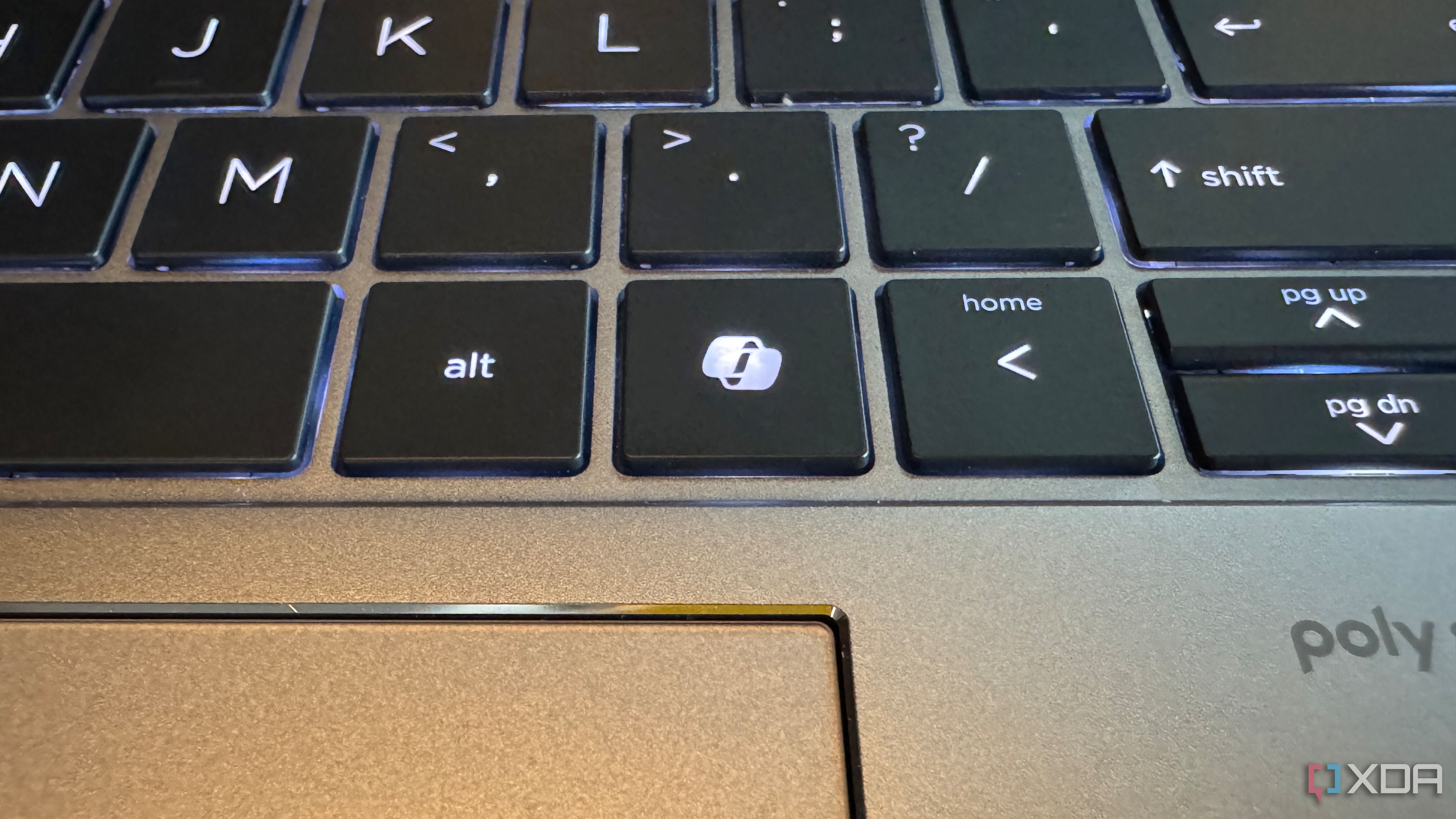
When Microsoft unveiled the Copilot key as part of its push to embed AI deeply into Windows, it marked the first significant alteration to the standard keyboard layout in years. The move replaced the familiar Right Ctrl key with a dedicated button for summoning the Copilot AI assistant. However, user feedback has prompted a rethink, and Microsoft now acknowledges that the change may not have been ideal for everyone. In an upcoming update, users will be allowed to remap the Copilot key to perform other functions, restoring flexibility to their keyboards.
The Rise of the Copilot Key
Microsoft’s integration of AI into Windows 10 and 11 reached a new level with the introduction of Copilot, an AI assistant designed to help with tasks ranging from writing to system navigation. To make Copilot easily accessible, the company decided to repurpose a key that had remained untouched for decades: the Right Ctrl key. This change was first spotted in pre-release builds and later rolled out to users as part of a broader update.
Initial Vision: Seamless AI Access
The logic behind the Copilot key was straightforward: give users a one-touch shortcut to AI. In a world where voice assistants and chatbots are becoming ubiquitous, having a dedicated key seemed like a natural progression. Microsoft envisioned a scenario where pressing the Copilot key would instantly open the AI panel, ready to answer questions, draft emails, or adjust settings without navigating through menus. For a time, this was the default behavior, and many users appreciated the convenience.
User Feedback and Real-World Usage
Despite the initial enthusiasm, real-world adoption revealed significant friction. The change disrupted muscle memory for countless users who relied on the Right Ctrl key for shortcuts like Ctrl+C (copy) and Ctrl+V (paste) when using their right hand. Additionally, accidental presses became a common complaint, especially for those who frequently brushed the key while typing or gaming.
Accidental Presses and Customization Needs
For power users, the inability to remap the Copilot key was a dealbreaker. Professional writers, developers, and designers often customize their keyboards to optimize workflow, and having a fixed key that did not align with their habits led to frustration. Online forums quickly filled with requests for Microsoft to offer a way to disable or reassign the Copilot key. The feedback was clear: while AI integration is welcome, users want control over their input devices.
Missing the Right Ctrl Functionality
The loss of the Right Ctrl key was particularly painful for those who used keyboard shortcuts extensively. Many applications rely on Ctrl combinations, and having only the Left Ctrl available forced users into awkward hand positions or increased the risk of repetitive strain. Gamers also complained, as the Right Ctrl is often mapped to crouch or other actions in many titles. The Copilot key’s presence, therefore, diminished the keyboard’s versatility.

Microsoft's Acknowledgment and Upcoming Changes
In response to the mounting criticism, Microsoft has quietly admitted that the Copilot key was not the slam-dunk they had hoped for. A recent statement from the company indicates that a future Windows update will allow users to remap the Copilot key to any function they desire, effectively restoring the option to use it as a standard Ctrl key or assign it to another action.
Remapping Option in Future Update
According to insider reports, the remapping feature will be integrated into the Windows Settings app under the Keyboard section. Users will be able to choose from a list of common functions, including reassigning it to Right Ctrl, opening a different app, or disabling it entirely. This move reflects a broader trend at Microsoft toward customization, acknowledging that one-size-fits-all solutions often fall short. The update is expected to roll out to Windows Insiders first, with general availability later in the year.
Implications for Keyboard Standard
The ability to remap the Copilot key raises questions about the future of dedicated AI keys. Microsoft may not be abandoning the concept entirely, but it is admitting that user choice must come first. This flexibility could serve as a model for other hardware vendors who have started including similar AI keys on their keyboards. For now, the Copilot key will remain present on newer keyboards, but its function will no longer be hardcoded.
Flexibility vs. Commitment to AI
Microsoft’s decision to allow remapping is a pragmatic move that balances innovation with user autonomy. While the company clearly wants Copilot to be a central part of the Windows experience, forcing it onto users via hardware was a step too far. By giving people the ability to customize the key, Microsoft preserves its AI vision without sacrificing the ergonomic and efficiency needs of its diverse user base. As the updates roll out, keyboard enthusiasts and everyday users alike can look forward to regaining control over one of the most essential input tools.