A Step-by-Step Guide to Strengthening End-to-End Encrypted Backups with HSM-Based Key Vault
A step-by-step guide to Meta's HSM-based Backup Key Vault, covering fleet deployment, over-the-air key distribution, and transparent fleet deployment for E2E encrypted backups.
Introduction
End-to-end encryption (E2EE) is critical for protecting user data, but backups often remain a weak point. Meta has developed a robust approach to secure backups using a Hardware Security Module (HSM)-based Backup Key Vault, ensuring that even the company itself cannot access user data. This guide walks you through the core steps Meta implemented to strengthen E2EE backups, from deploying a resilient HSM fleet to transparently proving secure deployments. Whether you're a security engineer or a tech enthusiast, these steps offer a blueprint for building a similar system.

What You Need
- Hardware Security Modules (HSMs) – tamper-resistant devices capable of secure key storage and cryptographic operations.
- Cloud infrastructure – multiple data centers for geographic distribution and resilience.
- Public-key infrastructure (PKI) – for fleet key validation bundles.
- Cloudflare (or equivalent) – as an independent signatory for validation bundles and audit logging.
- Secure replication protocol – majority-consensus replication (e.g., Raft or PBFT) for HSM fleet state.
- Application client (e.g., Messenger or WhatsApp) – capable of validating fleet keys and establishing secure sessions.
- Whitepaper – Meta’s complete specification (optional but recommended for deep dives).
Step 1: Deploy a Geographically Distributed HSM Fleet with Majority-Consensus Replication
The foundation of a secure backup system is a set of HSMs spread across multiple data centers. This distribution ensures that even if one location is compromised, the recovery codes – the keys needed to decrypt backups – remain safe.
- Choose HSMs that support secure key generation, storage, and cryptographic operations. They must be tamper-resistant to prevent extraction of secret material.
- Deploy HSMs in at least three geographically separated data centers to achieve resilience. The fleet must operate under a majority-consensus replication model (e.g., where a write is accepted only if more than half of the HSMs agree).
- Configure the vault so that each user’s recovery code is split among the HSMs using threshold cryptography. No single HSM holds the full code, and Meta cannot access it without approval from a majority of the fleet.
- Test the system to confirm that the recovery code is inaccessible to Meta, cloud storage providers, and any third party. Only the user’s client can reconstruct the code.
Step 2: Implement Over-the-Air Fleet Key Distribution for Dynamic Key Management
For applications like Messenger, where HSM fleets may be added without a client update, you need a mechanism to distribute public keys securely. This step describes how Meta uses over-the-air distribution with external validation.
- Generate a fleet public key for each HSM fleet. This key will be used by clients to establish an encrypted session.
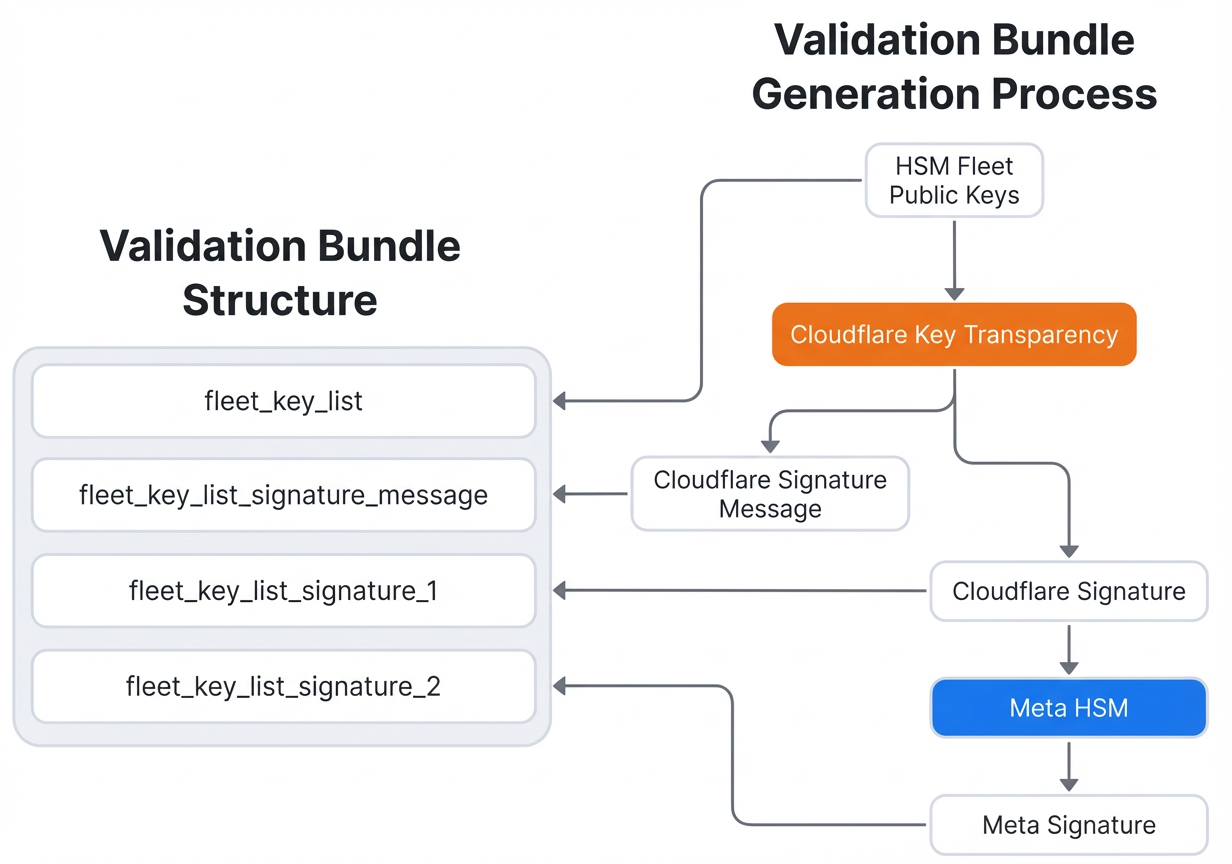
- Create a validation bundle containing the fleet public key. The bundle must be signed by Cloudflare (or a similar independent third party) and counter-signed by Meta. This dual-signature provides cryptographic proof that the key is authentic and not tampered with.
- Deliver the bundle over the air as part of the HSM response when a client first contacts the fleet. No app update is needed.
- Maintain an audit log at Cloudflare of every validation bundle issued. This log allows independent verification of all key distributions.
- On the client side, before establishing any session, validate the fleet’s public key by checking the signatures in the bundle. If the bundle is valid, the client can proceed with the encrypted backup protocol.
For full details, see the Validation Protocol section in the official whitepaper.
Step 3: Publish Evidence of Secure Fleet Deployments for Transparency
To build trust that the system operates as designed and that Meta cannot surreptitiously access backups, Meta commits to publishing evidence each time a new HSM fleet is deployed. Follow these steps to replicate this transparency.
- Document the deployment process for a new HSM fleet. This includes the hardware sourcing, physical security controls, firmware integrity checks, and initial configuration.
- Generate evidence artifacts such as signed attestations from the HSMs, audit logs from the deployment facility, and cryptographic proofs that the fleet’s private keys were generated securely (e.g., with a public ceremony).
- Publish the evidence on a dedicated blog or transparency page. Meta publishes theirs on the same page as this guide (see below). Ensure the evidence is easily verifiable by third parties.
- Provide a verification procedure – for instance, a step-by-step guide in the Audit section of the whitepaper that users can follow to independently confirm that the fleet is secure.
- Commit to publishing for every new fleet deployment, even though they occur infrequently (typically every few years). This long-term commitment reinforces accountability.
Step 4 (Optional): Integrate Passkey Support for User Convenience
Meta also made it easier for users to secure their backups via passkeys. While not mandatory, adding passkey support can improve the user experience without compromising security.
- Implement passkey enrollment so that users can authenticate with biometric or device-based credentials instead of a password.
- Ensure the passkey still relies on the HSM-backed vault for key recovery – the passkey merely unlocks the client’s ability to reconstruct the recovery code.
Tips and Best Practices
- Start small: Pilot the HSM fleet in a single region before expanding globally. This reduces risk and helps refine the deployment process.
- Use industry‑standard HSMs with FIPS 140-2 Level 3 or higher certification to meet compliance requirements.
- Regularly audit the Cloudflare audit log to ensure no unauthorized validation bundles have been issued.
- Combine passkeys with the HSM vault – passkeys improve usability but must not downgrade the core security provided by the vault.
- Educate users about the importance of their recovery code. Remind them that Meta cannot recover it for them.
- Read the full whitepaper entitled “Security of End‑To‑End Encrypted Backups” for complete technical specifications. It includes detailed cryptographic protocols and audit instructions.
By following these steps, you can build a system that offers the same level of end-to-end encrypted backup security as Meta’s, ensuring that your users’ data remains private – even from you.