8 Things You Need to Know About gThumb's Stunning GTK4/libadwaita Overhaul
gThumb 4.0 alpha: Vala rewrite, GTK4/libadwaita UI, WEBP/APNG animations, JXL export, censor filter. Try the modern open-source image viewer now.
gThumb, the beloved open-source image viewer and organiser, has undergone a radical transformation. With its recent rewrite in Vala and port to GTK4/libadwaita, the application looks and feels like a completely new tool. An alpha build of gThumb 4.0 is now available for testing, bringing not only a visual facelift but also a host of new features. This article unpacks the eight most important changes and improvements you need to know about.
1. Rewritten in Vala: Faster, Leaner, and More Modern
Under the hood, gThumb has been rewritten from C to Vala. Vala is a modern programming language that compiles directly to native code, offering a balance between high-level productivity and low-level performance. This rewrite means the codebase is cleaner, easier to maintain, and more efficient. As a result, users can expect quicker startup times, smoother navigation through large image collections, and reduced memory usage. The shift to Vala also makes it simpler for new contributors to join the project, as Vala's syntax is similar to C# and Java. For end users, the most noticeable benefit is speed — gThumb now feels snappy even when handling thousands of photos.

2. Ported to GTK4/libadwaita: A Modern, Cohesive Interface
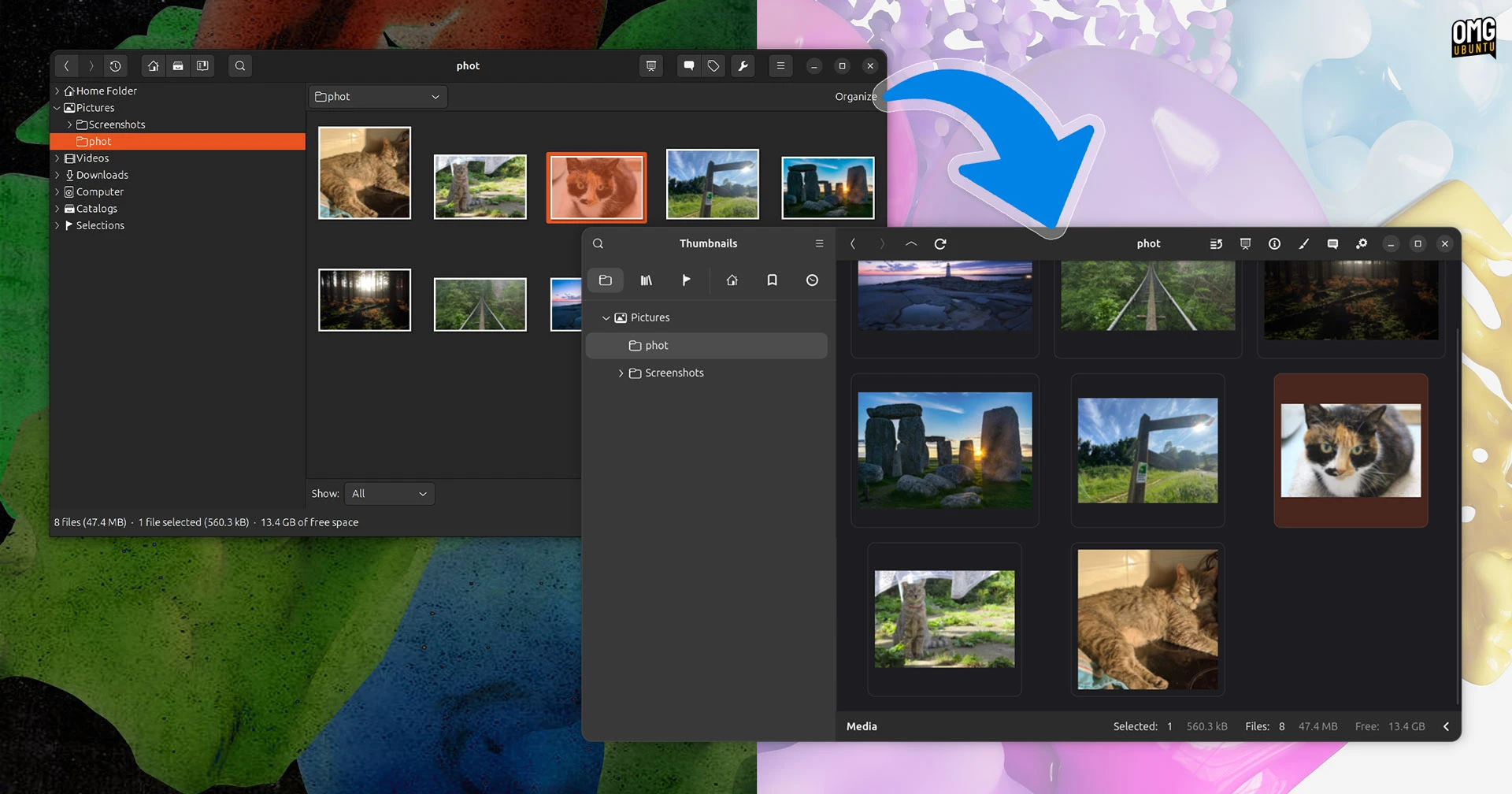
The most striking change is the port from GTK3 to GTK4 and the adoption of libadwaita. This isn't just an automatic upgrade; the developers have carefully redesigned the interface to adhere to modern GNOME design guidelines. The result is a clean, uncluttered layout with smoother animations, adaptive spacing, and a consistent look with other GNOME apps. Toolbars have been streamlined, buttons are more intuitive, and the overall aesthetic is bright and airy. The libadwaita library ensures seamless integration with GNOME's Adwaita theme, so gThumb now feels native on GNOME 42 and later. If you're running a GNOME desktop, this update makes gThumb feel like a first-class citizen.
3. Visual Revamp: Gorgeous New UI That's Almost Unrecognisable
Beyond the technical port, gThumb's entire user interface has been reimagined. The old toolbar and sidebar have been replaced with a more intuitive sidebar that collapses elegantly on smaller screens. Thumbnail views are now cleaner, with better spacing and hover effects. Even the file chooser and preferences windows have been updated with modern toggle switches and rounded corners. The transition from the old GTK3 look to the new GTK4/libadwaita style is night and day — menus are flatter, icons are refreshed, and the colour palette is softer. It's a visual overhaul that makes the application feel contemporary and polished, without losing any of its functionality.
4. WEBP Animation Support: View WebP Files Natively
gThumb 4.0 adds native support for WEBP animations. WEBP is a modern image format that offers superior compression compared to JPEG and PNG, and its animated variant is increasingly used on the web. Previously, users had to rely on external tools or browser extensions to view animated WEBP files. Now, gThumb can open these files directly, with smooth playback and full support for looping. This is a significant addition for users who download animated stickers or memes from the internet, or who work with web-optimised graphics. The support is built-in, so there's no need for extra codecs or plugins.
5. PNG Animation Playback: A Long-Awaited Feature
Alongside WEBP, gThumb now also handles animated PNG (APNG) files. While PNG is typically a static format, APNG extends it to support frame-based animation. Many applications still lack native APNG support, forcing users to convert to GIF or use workarounds. gThumb 4.0 eliminates this hassle. You can open APNG files and view them as animations, with control over play/pause and speed. This is especially useful for developers, designers, or anyone who deals with lossless animated graphics. The integration is seamless, and the animation engine is well-optimised for performance.
6. Export Images in JXL Format: High-Efficiency JPEG XL
Another major addition is the ability to export images in JPEG XL (JXL) format. JPEG XL is a next-generation image codec that promises excellent compression efficiency, lossless quality, and advanced features like HDR and wide colour gamut support. While still gaining traction, it's considered a strong candidate for the universal image format of the future. By adding JXL export, gThumb positions itself as a forward-thinking tool. Users can now convert their photo libraries to JXL for space savings without sacrificing quality. The export dialog includes options to adjust quality settings and metadata preservation, making it easy to batch-process large collections.
7. Censor Filter: Blur or Pixelate Sensitive Areas
Privacy and security are increasingly important, and gThumb 4.0 includes a handy censor filter. This tool lets you apply a blur or pixelation effect to selected areas of an image. For example, you can obscure faces, licence plates, or personal data before sharing screenshots or photos online. The filter is non-destructive — it works on a copy of the image — and supports customisable intensity. You can choose between blur (Gaussian blur) or pixelation (mosaic) modes, adjust the size and shape of the censored area, and even apply multiple masks. This feature is straightforward but powerful, saving users from needing a separate image editor for quick redactions.
8. Alpha Build Available: Try the Future of gThumb Today
All these improvements are currently available in an alpha build of gThumb 4.0. While alpha software may contain bugs and incomplete features, the core functionality is stable enough for daily testing. The developers encourage adventurous users to download the build from the official GitLab repository or via the Flathub beta channel. By testing it now, you can help shape the final release by reporting issues and providing feedback. The alpha also gives you a sneak peek at the direction gThumb is heading — a more modern, faster, and feature-rich image viewer that remains true to its open-source roots. The stable release is expected later this year.
Summary: gThumb 4.0 represents a dramatic leap forward. The Vala rewrite and GTK4/libadwaita port bring a fresh, fast interface. New format support (WEBP animations, APNG, JXL export) and a censor filter add practical tools. The alpha build is available now for those eager to try it. This update ensures gThumb remains a top choice for Linux users who need a powerful yet simple image organiser.